One UI 8: Release date, new features, supported devices

What we know so far
The One UI 8 is officially here, though not too many Samsung phones have it at the moment.
Right now, it's the Galaxy Z Fold 7 and Galaxy Z Flip 7 (announced in July 2025) that are on One UI 8.
Flagships like Galaxy S25 and Galaxy S25 Ultra have to wait until September, when the major software update is expected to be rolled out en masse.
The Android 16-based One UI 8 is in beta testing for S25 (and a few older Galaxy phones) and everybody who opts for the program is free to share their thoughts on the operating system.
The beta version focuses on refining the user experience through smarter AI tools, polished design elements, and subtle performance optimizations rather than radical visual changes.
Jump to:
One UI 8 release date
One UI 8 was presented on July 9, when the Galaxy Z Fold 7 and Galaxy Z Flip 7 were unveiled at a NYC event.
The One UI 8 beta program is currently available for other Galaxy devices, flagship and mid-range as well. You can see the full list here:
The stable One UI 8 release will be disseminated gradually to eligible devices, starting with flagships and recent models first in the fall of 2025.
| One UI version | Release date |
|---|---|
| One UI 8 (Android 16) | July 9 |
| One UI 7 (Android 15) | April 10, 2025 |
| One UI 6 (Android 14) | October 30, 2023 |
One UI 8 beta program
The One UI 8 beta program is up and running at the moment, so those who want to give it a try can do so easily. Samsung's Android 16-based custom skin is available for testing by enrolling in the One UI 8 beta program.
The One UI 8 beta program started at the end of May 2025. Like all beta programs, it's usually reserved for tech-savvy users that have some experience in dealing with an early build of mobile operating systems.
Samsung has today announced that starting next week – that's August 11 – the beta program for One UI 8, based on Android 16, will roll out to older devices in select countries.
Starting August 11, those who live in the US, South Korea, the UK or India, and have a phone of the following, will be able to participate in the beta program:
Then, in September, One UI 8 beta will arrive for the following devices:
Starting August 11, those who live in the US, South Korea, the UK or India, and have a phone of the following, will be able to participate in the beta program:
- Galaxy S24 series
- Galaxy Z Fold 6
- Galaxy Z Flip 6
Then, in September, One UI 8 beta will arrive for the following devices:
- Galaxy S23 series
- Galaxy Z Fold 5
- Galaxy Z Flip 5
- Galaxy A36 5G
- Galaxy A55 5G
- Galaxy A35 5G
- Galaxy A54
A beta program is like getting an early peek at new features, designs, and improvements on your phone. Since it's still being tested, the software might have bugs or issues, so it's not always smooth. People who join can give feedback to help Samsung fix problems before the final version is rolled out to everyone.
It's a good idea to install a beta operating system on a phone that's not your daily driver – so if severe bugs or issues occur, you still have a functioning phone.
One UI 8 beta timeline
The One UI 8 beta kicked off on May 28, 2025, in the United States, South Korea, Germany and the United Kingdom.
The One UI 8 beta 2 (the second iteration of the beta program) launched on June 12, 2025. This version added India and Poland to the regions where the One UI 8 beta is available. The One UI 8 beta 2 has introduced a feature called Back Swipe Preview, which needs to be enabled manually through Settings > Advanced Features > Labs. Once turned on, it gives users a visual preview of the previous screen while performing a back gesture by swiping from the edge. However, this feature currently only works within the Settings menu and is not supported in other apps.
Based on Android 16, this update doesn't bring a major visual overhaul like some past versions, but instead focuses on polishing the overall experience with a range of smaller improvements across the system.
One UI 8 beta: How to enroll
If you feel confident you have what it takes to participate in the One UI 8 – technical knowledge above the average, some courage and an eligible device – here's what you have to do.
- Make sure you have an eligible phone (the Galaxy S25 series – for the moment)
- Make sure you have downloaded the Samsung Members app and you're logged in
- Once in the Samsung Members app, tap the One UI 8 beta program banner on the homepage
- On your phone, select Settings > Software update > Download and install.
The phone will restart after the installation is completed. Keep in mind that this is a test software, so bugs and glitches are possible.
Still, Samsung appears to be moving faster this time after delays and confusion with last year's One UI 7 rollout. By starting the beta program earlier than expected, the company seems eager to avoid repeating past mistakes.
Understanding One UI 7 and 8 Availability
You may have heard that One UI 7 was very late for Samsung Galaxy devices – and that's a fact. Now, as it seems, One UI 8 is going to be on time – even earlier, because Google will apparently release Android 16 earlier this time around (in the summer, instead of the fall).
Although Android 15 debuted in October 2024, Samsung's beta program didn't begin until December 2024 and was restricted to top-tier devices like the Galaxy S24 and certain foldables. Even after its initial release in January and April 2025, the rollout was repeatedly slowed by bugs discovered during Beta 3 and 4, especially affecting the S24 series. This resulted in a fragmented and protracted deployment, drawing criticism from users frustrated by unstable updates and missing features.
Samsung's stable One UI 7 rollout began in April 2025, starting with flagship devices like the Galaxy S24 series, Galaxy Z Flip 6, and Z Fold 6. In May, the update expanded to major 2022 and 2023 models, including the Galaxy S23 series, S22 series, S21 series, Z Fold 5, Z Flip 5, and the Galaxy Tab S9 and S8 lineups.
By June 2025, the rollout reached Samsung's mid-range phones such as the Galaxy A54, A34, A35, A55, and several M and F series models. Budget-friendly phones like the Galaxy A14, A15, A05s, and XCover 7 also began receiving the update during this month.
The update is not yet over – it concludes in July with the Galaxy Tab A9, marking the end of Samsung's One UI 7 deployment schedule. Overall, the flagship and premium devices received the update within the first two months, while mid-range and entry-level phones followed in the months after.
In contrast, One UI 8 has had a far more streamlined and proactive launch. Following internal testing starting around March 2025, Samsung officially released the public beta for the S25 family devices.
With a summer launch planned to coincide with the Galaxy Z Fold 7 and Flip 7, One UI 8 is on track to avoid the delays and sporadic availability that marred its predecessor.
Let's hope that no hiccups occur this time!
One UI 8 top new features
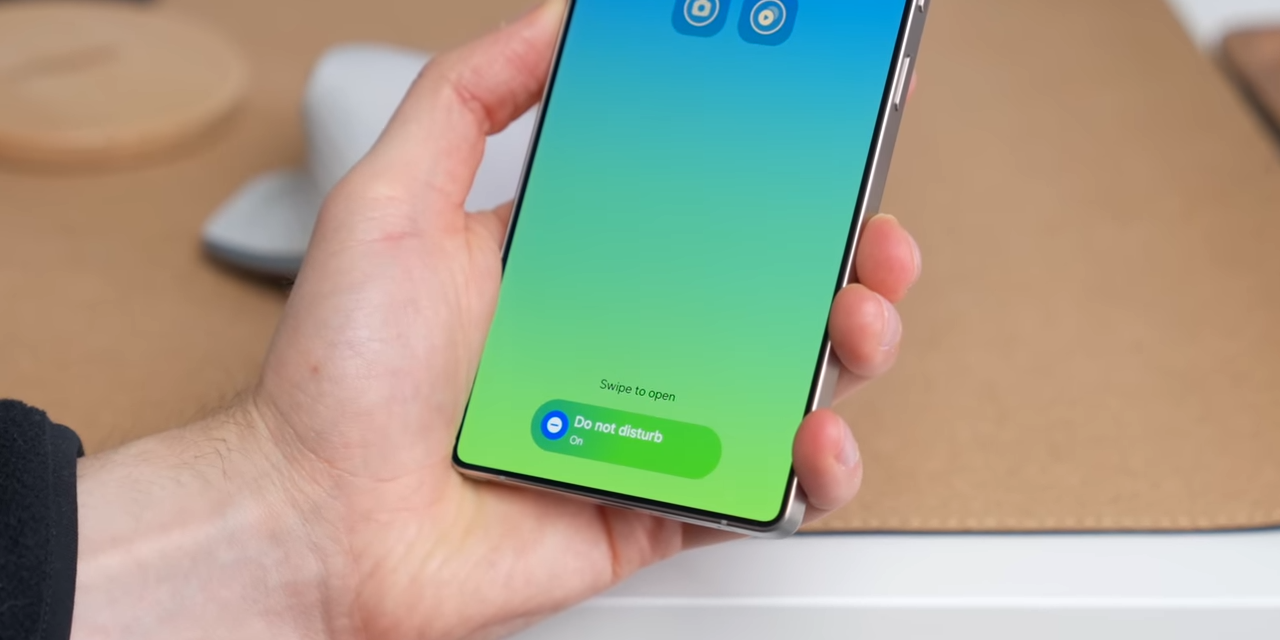
Galaxy One UI 8's new Now Bar. | Image credit – Android Authority
One UI 8 expands on the AI features first seen in the Galaxy S25 series to make Samsung devices feel more intelligent and responsive to your needs. It doubles down on multimodal AI, which means the software can understand what you're doing by analyzing a mix of inputs beyond a simple text command. Multimodal AI means that the AI agent can understand what you're looking at on screen, what you're doing with your hands, or even your typical behavior. Based on this context, it offers useful suggestions through features like the Now Bar, the small panel that shows things like music controls or call info, and Now Brief – a summary of relevant tasks or updates for your day.
File sharing is easier too, thanks to an improved Quick Share feature, which lets you send or receive files with just one tap. The Reminder app is now smarter and more intuitive, with better organization and voice input. One UI 8 also supports Bluetooth Auracast, a newer audio sharing standard that allows several people to connect to the same audio stream – this one enables sharing music with friends or linking multiple earbuds – by scanning a QR code.
Samsung has improved alarm groups, letting users bundle and manage multiple alarms together more easily. You can even add a group of alarms to your home screen as a widget. For customer support, Samsung now allows NFC (tap-to-connect) and QR code scanning to register for service quickly, cutting down wait times at repair centers.
One UI 8 design changes
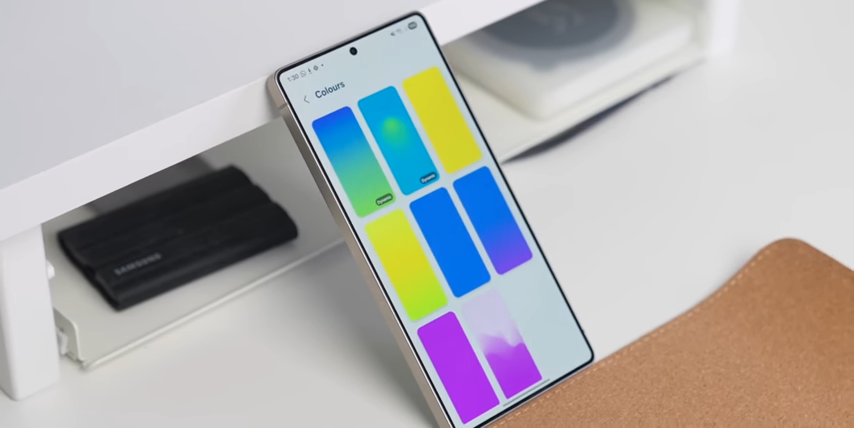
Galaxy One UI 8's new Now Bar. | Image credit – Android Authority
One UI 8 focuses on polishing the user experience through refined visuals and smarter interface behavior rather than drastic redesigns.
Animations are fine-tuned – for example, when closing multiple apps quickly, the transition no longer stutters or cuts off, resulting in a smoother and more cohesive visual flow.
The Now Bar, introduced in One UI 7, is getting a more functional design in One UI 8. It now works more consistently across different screens, including the external cover screen on foldables like the Galaxy Z Flip.
This makes it easier to view notifications, media controls, or call info without unlocking the phone. Additionally, the user interface adapts better to different device types, with a layout tailored to the unique form factors of phones, tablets, and foldables, improving how information is displayed and interacted with on each device.
One UI 8 performance and battery improvements
While the update doesn't highlight massive speed boosts or power-saving features, One UI 8 introduces more intelligent system behavior that indirectly enhances performance.
AI tasks are handled locally on the device when users prefer, reducing cloud dependency and potentially improving responsiveness while preserving privacy. The system is also optimized to work more efficiently with the device's hardware, which may help battery life, particularly on newer models like the Galaxy S25 or the Galaxy Z Fold 7. These behind-the-scenes upgrades, combined with interface efficiency tweaks, deliver a smoother, more stable user experience overall.

Follow us on Google News



 FCC OKs Cingular\'s purchase of AT&T Wireless